


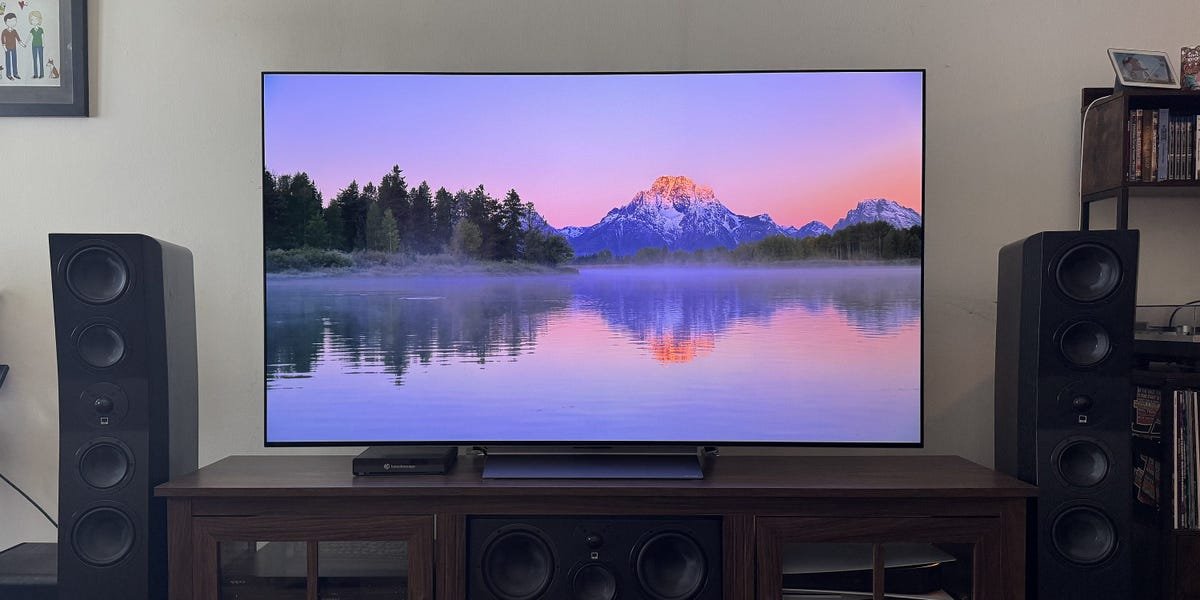
LG’s C-Series OLEDs consistently rank high on many top TV lists. As someone who reviews TVs for a living, I’ve helped a few friends invest in one, and they’re always incredibly satisfied. Even more than a year since it first hit stores, the brand’s C5 OLED continues that tradition, remaining an excellent value.
It delivers solid brightness, has excellent color accuracy, and produces the deep, inky black levels OLED TVs are known for. It also boasts AI features (as does everything nowadays) and a long-needed remote redesign.
After putting the C5 through my extensive testing process, here’s why this 2025 TV model is still an excellent buy in 2026.
LG 65-inch C5 OLED 4K TV
The C5 is an excellent midrange OLED TV. It delivers high contrast and deep black levels while offering a slightly brighter image than the older C4 model.
A familiar design, but the remote has been refreshed
John Higgins/Business Insider
The C-Series is one of LG’s most expansive TV lines, so it’s no surprise that the C5 is available in six sizes: 42, 48, 55, 65, 77, and 83 inches. My review sample is a 65-inch model provided by LG. All sizes but the 42-inch version use an angled pedestal stand (the 42-inch TV has two widely spaced feet).
The connections are on the left side of the TV (when facing the front) and include four HDMI 2.1 ports (with eARC on HDMI 2), three USB 2.0 ports, LAN, optical audio out, RS-232C, RF antenna, and an IR blaster port. The TV also supports Bluetooth 5.3 and WiFi 6E connectivity. The power cable is hard-wired and extends from the middle of the set. The back of the panel has an interesting textured marble look and feel. I’ll admit that I dig it, but am also a bit surprised when cool design elements like this are so hidden, considering few are likely to see the panel’s rear.
One of the C5’s biggest changes isn’t even on the TV itself. It’s a new design for LG’s Magic Remote. I’ve never been much of a Magic Remote fan, so I was excited that a change was in store. While the old Magic Remote had a chunky, curved design that was meant to be ergonomic (I never found it to be), the new one has a more traditional rectangular design. It fits more comfortably in my hand, and there are significantly fewer buttons because the redesign has removed all numeric functions.
John Higgins/Business Insider
It’s a vast improvement over previous iterations, but it’s still not perfect. For one, it isn’t backlit, which is annoying in a dark room, and there’s no input select button. Instead, you need to navigate through the Home menu to select an input on screen. There isn’t a dedicated mute button either. Muting can still be achieved by holding the volume down button. But by mapping the function this way, it’s now difficult to quickly lower the volume rather than completely mute it. It’s just an odd design choice.
The Magic Remote still has its motion control tech, which lets you wave it around like a wand to move a virtual cursor on the screen. This remains a divisive feature, and there’s still no way to turn it off completely. You can press down on the directional pad to navigate the TV in a traditional manner, but the motion controls are reactivated whenever you move the scroll wheel, which is too easy to accidentally toggle. Hopefully, LG will add a way to fully disable the wand feature for those who dislike it.
The C5 delivers great picture quality
John Higgins/Business Insider
TVs — especially those in the midrange class and above — have grown so close in performance that it’s hard to find significant fault with all that much. This is even more true for the best OLED TVs, because no matter the price point, they have perfect black levels at the pixel level (since the pixels can actually turn off) and are generally highly color-accurate.
The LG C5 is no exception. I measured the C5 using a Portrait Displays C6 HDR5000 colorimeter, G1 pattern generator, Konica Minolta LS-100 light meter, and Calman calibration software. The LG C5 ships in Auto Power Save mode, which exhibits an extreme blue tint and overbrightens most midtone grays. For an accurate picture, the first thing you should do is switch into either Filmmaker or Cinema mode. After that, navigate to the energy saving option in the General settings menu and change Energy Saving Step from Auto to Off. This will unlock the brightness adjustments.
In Filmmaker and Cinema modes, high-dynamic-range (HDR) grayscale accuracy tracks incredibly well. DeltaE (dE) errors, which indicate how close the measurements are to perfect readings (the lower the better), were under the perceptible value of 2.3. The C5 covers 98.6% of the P3 color gamut and 73.34% of the BT.2020 color space, both of which are excellent for an OLED of this type. Standard dynamic range (SDR) performance is equally impressive, with an average grayscale dE of just 1.9, a gamma of 2.21, and 98.7% coverage of Rec. 709 (the standard SDR color gamut used for most cable, satellite, and live TV streaming services).
In SDR with brightness set to 100, the C5 outputs 410 nits within a 10% window. If you plan to watch SDR content in a suitably dark room, a brightness setting of 11 reduces light output to 104 nits, just above the target of 100. If you prefer a slightly brighter picture for your SDR content, setting 40 increases light output to 202 nits.
With an HDR signal, the LG C5 delivers respectable brightness for a midrange OLED. On a 10% HDR window, the C5 hit 1,174 nits. But the C5 still can’t compete with LG’s G-Series models, which can hit over 2,000 nits, or flagship Mini LED TVs from Hisense and TCL that can surpass a whopping 4,000 nits.
John Higgins/Business Insider
What does this brightness mean with actual content, though? Small, bright portions of the screen (called specular highlights) sparkle, adding life to the picture when watching HDR movies and shows. This is especially true because OLED tech can light a single pixel at a time. I was lucky to have my review period line up with the premiere of “Andor” season two, and just the opening title sequence, where the word Andor appears amid a space sky littered with stars, looked stunning. The blaster fire from the stolen TIE prototype lit up the Yavin IV night, as did the resulting explosions against the dark landscape.
Dark shadows also provide great detail. The piano against the back wall of Sapper Morton’s home in the early scenes of “Blade Runner 2049” stands apart and gives the image great dimensionality. On less capable TVs, the piano in this sequence tends to meld into the wall.
Colors on the C5 looked lush and rich. The hills of the Shire and the forests around Rivendell in “Fellowship of the Ring” were inviting and realistic. And the fireworks at Bilbo’s birthday celebration sparkled with light and color to the delight of all.
The C5 uses a traditional WOLED panel rather than a Quantum Dot OLED (QD-OLED) panel, which is used on some competing Samsung TVs. The main shortcomings of WOLED when compared to QD-OLED are color volume and brightness. As such, Samsung’s S90F can get a bit brighter and has slightly wider color capabilities than the C5.
The LG C5 is a very capable gaming TV
John Higgins/Business Insider
In the past, I’ve recommended the Samsung S90 series to friends and readers as a gaming-centric television. It used to set itself apart from many direct competitors by supporting cloud gaming through the Xbox app with Game Pass, allowing access to a vast catalog of games without a console. It also has a high 144Hz refresh rate with PCs. Both of those features were missing on LG’s older C4.
But the C5 levels the playing field. It now supports cloud gaming through the Xbox app and a 144Hz refresh rate with PCs. It also uses Nvidia G-Sync and AMD FreeSync Premium variable refresh rate (VRR) technologies.
I played “Clair Obscur: Expedition 33” through the Xbox app with a wired Gigabit connection and was overall impressed. The image still isn’t as detailed as it is when playing the game locally on my Xbox Series X, and streaming causes some posterization (likely from compression), especially in dark portions of the screen, but the game was responsive. I would still opt for a console to get the best visuals, but using the app is a great way to get your gaming fix without dropping a few hundred dollars for a Series S or X.
Another small drawback to using cloud gaming instead of a console is that LG’s Game Optimizer menu is only available with an HDMI connection. I’m a fan of the Game Optimizer menu, which displays frame rate, VRR, latency, and black stabilizer information while making it quick and easy to access these gaming features. Pressing the settings button on the remote opens the Game Optimizer menu instead of the usual settings menu you get when watching regular TV.
The one issue with the default Game Optimizer Picture Mode is that its color leans very blue. This does make the image appear brighter, but it causes the colors to be inaccurate. To bring the color accuracy in line with Filmmaker Mode, under the Picture menu, you can go to Advanced Settings, then Color, White Balance, and change Color Temperature from 0 to Warm 40. I also switched Color Gamut from Native to Auto Detect, and boosted OLED Pixel Brightness in the Brightness menu up to 100 (from the default of 80).
AI features are mostly unnecessary, but Voice ID is a cool addition
LG/Best Buy
When the C5 launched, LG touted a few new AI software features for its webOS smart TV system, including a new AI Sound Wizard, joining the previously available AI Picture Wizard. These modes let you customize your picture and sound settings by viewing different images and listening to different audio clips. Based on the images and audio clips you select, the system learns which picture and sound elements you favor and then creates custom settings tailored to your preferences.
While that sounds cool in theory, these modes generally introduce unnecessary adjustments. If you’re unhappy with any of the TV’s built-in presets, it could be worth giving the AI Wizards a whirl, but you can get the most accurate performance by simply choosing the TV’s Filmmaker picture mode and Standard sound mode.
A more interesting addition, though, is the ability to support up to 10 user profiles, each with unique preferences and content recommendations. Each profile can be tied to a Voice ID (after you agree to share your biometric data), so the TV will automatically switch to your profile when you speak into the remote. In my experience, it only took a few seconds for the profile switch to happen. The profile is linked to your LG account, and the settings and layout preferences are saved in the cloud, so you could sign into your friend’s C5 when you visit to pull up your own preferences easily (as long as there’s space to add your account).
That’s a niche example, but the ability for a family to easily switch between profiles so kids can access the apps most interesting to them, while one of their parents can later speak into the remote and call up their profile setup, is intriguing.
Otherwise, LG’s webOS smart TV system remains much the same as before. That is to say, it gets the job done but isn’t likely to wow you. You get access to all of the most popular streaming apps, and navigation speed is solid. The interface’s emphasis on ads and shopping recommendations is a bit of a drag, but you can disable them in the menu system.
While sound performance is lacking, Auracast inclusion is a welcome perk
LG
There aren’t many TVs out there with sound I would call decent. It’s an inherent flaw of the thin design of modern displays, and very few can overcome it. Unfortunately, the C5 falls victim to this common pitfall. While dialogue can generally be heard clearly, the sound is thin and a bit tinny. If you’re buying a set like this, it’s worth adding a soundbar to the package to enhance the overall performance. Or better yet, an AVR with a full surround sound system.
On that note, the C5 has an interesting feature I hope to see added to more TVs: Auracast support. Samsung started supporting it on select models in 2023, but it’s nice to see it on the C5. Auracast allows the TV to transmit over Bluetooth to multiple devices simultaneously, rather than to a single device. I tested this with a few different Auracast-capable headphones and earbuds, including the JBL Tour One M3 headphones, Earfun Air Pro 4 earbuds, and the LG xboom Buds.
In the Sound menu, you can enable Auracast broadcasting and select a sampling rate: 16kHz, 24kHz, or 48kHz. Then, from your headphones app, you can connect to the broadcast signal with any number of devices. With the JBL and the LG headphones, the process worked flawlessly with audio playing through both, and I could watch without distracting my family or worrying about being too loud for my neighbors late at night. The Earfun were a bit tricky to get working, but that was due to the earbuds and their app, not the C5.
There’s also no lag between headphones and the TV, so the Auracast connection could help people better control the intelligibility of what they’re watching.
How does the LG C5 compare to the new C6?
Steven Cohen/Business Insider
LG now offers a 2026 edition of its C-Series, called the C6. The C6 is available in 42, 48, 55, and 65 inches. We’re testing the 65-inch C6 now for a full review, but based on earlier impressions and specs, this new model offers very similar performance overall.
Since the C5 is often sold at a discount, it’s the better buy for most people. However, that will change over the coming months as the remaining C5 stock sells out. With that in mind, I recommend grabbing the C5 while it’s still available.
It’s also important to note that in 2026, LG also launched a new submodel in the C-Series, the C6H, which is only available in 77- and 83-inch sizes. The C6H uses a more advanced panel that delivers a substantial brightness upgrade over the C5. It costs more than the C5, but it could be worth the extra money for viewers who favor a brighter picture. You can learn more in our full LG C6H OLED TV review.
Should you buy the LG C5 OLED TV?
John Higgins/Business Insider
The LG C5 was one of the top midrange TVs released in 2025, and it remains one of the best LG TVs you can buy today. When it comes to other midrange OLEDs, its biggest rival is the Samsung S90F, which offers slightly better color and brightness. In that sense, the S90F has an edge, but the C5 is an excellent alternative for those who prefer LG. And depending on current sale prices, certain C5 sizes may cost less than comparable S90F options.
The newer LG C6 OLED is also a fine option, but the 42-, 55-, and 65-inch sizes don’t offer much of an upgrade over the C5, and they’re typically more expensive. For that reason, the C5 remains the better value while it’s still in stock.
For more display recommendations, check out our complete guide to the best TVs.
