


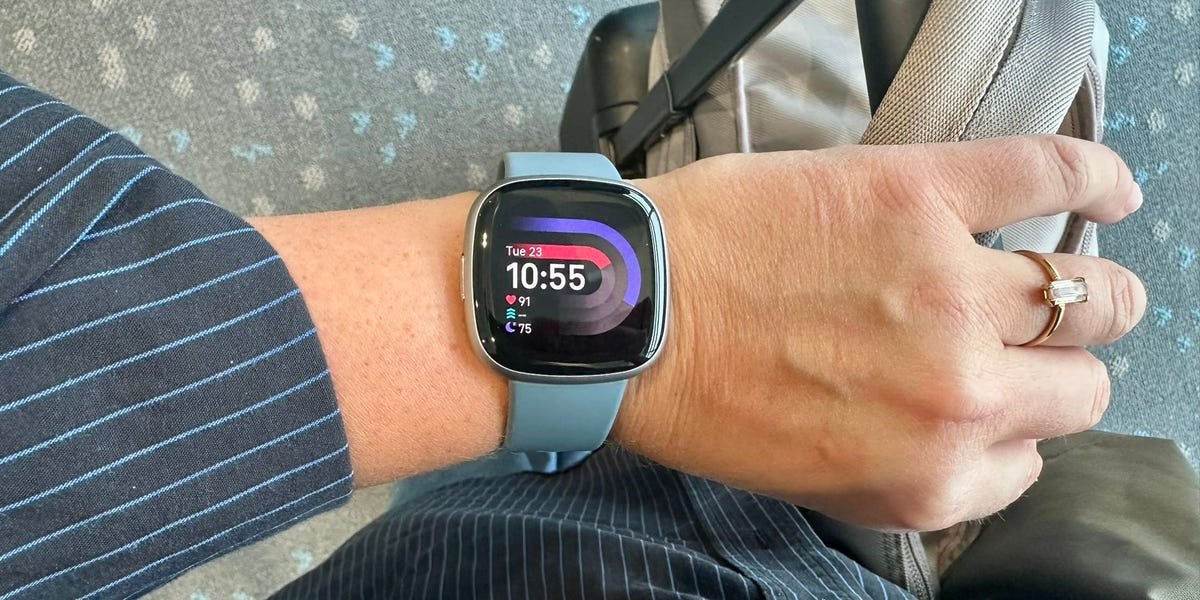
Over the years, Fitbit has established itself as a leader in health and fitness tracking, with devices that boast reliable heart rate sensors and compact, user-friendly designs. The Versa 4 is one of the company’s pricier offerings, and it packs all of the brand’s fitness tracking perks into a sleek design that resembles a full-fledged smartwatch more than a typical Fitbit. However, despite some cool touches here and there, the device falls short of its full potential.
While testing the best Fitbits over the last six months, I found the Versa 4 to be Fitbit’s most stylish wearable. It’s equipped with a bright AMOLED display, a built-in mic and speaker for calls, and a wide range of fitness tracking tools that make it feel like the Fitbit we’ve always loved, all grown up.
After six weeks of testing it — tracking runs and workouts, analyzing my sleep, and skimming notifications — I came away with a lot of appreciation for this watch’s comfort, functionality, and streamlined look. However, I also encountered several frustrations, including an oft-glitchy touchscreen, underwhelming smart features, and an overall sense that the technology just isn’t holding up against other options that I recommend more, like the Garmin Vivoactive 6 and Google Pixel Watch 3.
Ultimately, the Versa 4 has some selling points, particularly for casual exercisers who want to stay within the Fitbit ecosystem yet prefer a smartwatch design. But, as an avid wearable tester, it’s far from the best fitness tracker for most people. Here’s what I found.
Fitbit Versa 4
The Fitbit Versa 4 is a comfortable midrange tracker that offers Fitbit functionality in a smartwatch design. However, its actual smartwatch features are too limited to justify its price.
What I liked most
Rachael Schultz/Business Insider
It’s very comfortable — and more accurate because of it
The Versa 4 is easily one of the most comfortable wearables I’ve ever tested, especially considering its generous screen size. While a lot of round watch faces only make contact with your skin in the middle, the Versa 4’s rounded square face sits flush against your wrist in a way that makes it feel nearly invisible throughout the day and while sleeping. This means I was more inclined to wear it 24/7, and that snug fit also gives the heart rate sensor uninterrupted skin contact, which improves the accuracy of key health metrics like sleep and stress scores.
The display is large, sleek, bright, and customizable
The 1.58-inch AMOLED display is crisp and legible in both bright sun and indoor lighting, and you can choose from practically hundreds of different watch faces and colors to tailor the smartwatch to your personality and style. Unlike a lot of other Fitbit models, which have frustratingly small screens, the Versa 4 is large enough to read an entire text message and to generally display all the info you could want at a glance.
Rachael Schultz/Business Insider
Additionally, the Versa 4 comes preloaded with the basic screens most people need: step overview, sleep data, timer, and the ability to start an exercise recording (which you can access by swiping right or left from the main clock). In addition to the aforementioned, there’s a useful overview page called “Today’s Activity,” which displays your zone minutes, steps, calories burned, distance moved, and staircases climbed. You can also long-press the Versa 4’s physical side button to add more quick-access apps, such as an alarm.
It has a ton of fitness features to improve your health
Fitness is the cornerstone of Fitbit’s brand, and though the Versa 4 looks like a sleek smartwatch, it’s well-equipped as a fitness tracker. It comes with over 40 workout modes, including treadmill, outdoor running, cycling, strength training, HIIT, yoga, rowing, swimming, and even niche options like paddleboarding and golf. That wide variety makes it easy to accurately track most types of movement, allowing the Versa 4 to function more like a daily training tool than just a step counter or a text message relayer.
There’s also a unique feature that enables you to set custom goals within each workout mode — such as time, distance, calories, or Active Zone Minutes — depending on what you’re trying to achieve in a session. For instance, in Treadmill Mode, you can preset a 30-minute duration or 30 Active Zone Minutes, and the watch will gently buzz once you’ve hit it. Real-time stats like pace, heart rate, and zone tracking cleanly display on the screen, and outdoor workouts can use the built-in GPS and altimeter to log routes, distance, and elevation without needing your phone.
Rachael Schultz/Business Insider
Once you sync with your phone after a workout, you can access more details in the Fitbit mobile app, such as heart rate zones, recovery trends, pace, cadence, and — for outdoor activities — a GPS route map. That said, I did find it a little annoying that I couldn’t see this info on the watch itself. If I wanted to know at lunch how long my morning run was, I’d have to open the mobile app to find out.
One feature I do like is that Fitbit tracks Active Zone Minutes, a proprietary metric that rewards time spent in moderate to vigorous heart rate zones. I found this to be a streamlined way to quantify effort across different types of workouts at the end of the day, and it’s super helpful mid-workout to know that your heart rate has been in the target zone often enough to count.
Additionally, the Versa 4 utilizes Fitbit’s “Reminder to Move” program, a vibration alert that prompts you to get up if you haven’t hit your hourly activity goal of 250 steps — a feature I found to be incredibly helpful across all the Fitbits I tested when I’d get sucked into work projects.
The battery life is solid at just under one week
Fitbit says you’ll get up to six days of battery life with the Versa 4. During testing, I found this to be right on the mark with regular smart notifications coming through and GPS running for daily dog walks. The more often I used my GPS, the shorter the battery life, of course (the same applies if you opt for the always-on screen).
While a six-day battery life is way longer than any Apple Watch (usually around 36 hours), it’s shorter than either of Garmin’s smartwatches, the Vivoactive 6 (11 days) or the Venu 3 (14 days), and shorter than most of Fitbit’s other watches.
Fitbit’s sleep tracking is really nice
Like the Fitbit Inspire 3, the Versa 4 is a great device for sleep tracking, in part because it’s comfortable to wear overnight and doesn’t flash a blinding green sensor light when you roll over. The watch delivers accurate, easy-to-understand insights with the free Fitbit app, including time asleep, sleep stages, and overall sleep quality. With a Premium membership, you receive more detailed data, including an analysis of your sleep duration, heart rate during sleep, and restlessness.
Rachael Schultz/Fitbit/Business Insider
You can also set an alarm on the Versa 4. One feature I really liked on the Inspire 3 was “smart wake”, an alarm that vibrates when you’re in a light stage of sleep within 30 minutes of your desired wake up time; the Versa 4 is supposed to have this as a toggle option when you set an alarm, but no matter how many times I tried (and how many “how tos” I read through on Google), I could not find this option while setting an alarm. Fitbit says it should be available, but I haven’t been able to activate it.
Where it falls short
It’s underwhelming as a smartwatch
Yes, the Versa 4 can take calls on your wrist (if your phone is nearby). You have to set this feature up separately in the Fitbit app, which could be confusing for some, but I found it simple enough to pair the calling feature with my iPhone. After it’s set up, you just press the answer button on the watch and chat away.
Rachael Schultz/Business Insider
The Versa 4 will also display notifications and allow you to dictate replies if you’re an Android user. However, iPhone users can only read texts, not respond, and even Android users must have the Fitbit app running in the background for dictation to work (which noticeably drains phone battery). Moreover, the Versa 4 doesn’t allow you to load or control third-party apps or store music on the device itself, so while you can use the GPS on a run without your phone, you’ll have to go without tunes.
To put it simply, although the Versa 4 looks like a smartwatch, it doesn’t behave like a fully capable one, and certainly doesn’t integrate as seamlessly with your phone as an Apple Watch for iPhone users or a Google Pixel Watch for Android users.
The touchscreen is a bit finicky
As a smartwatch, it’s no surprise that the Versa 4 has a touchscreen. However, during testing, I found that the touchscreen often felt too laggy or too jumpy, and it rarely functioned as expected. Sometimes, it was just slightly laggy when swiping between screens. But that lag was often much more obvious. I frequently had to tap the screen multiple times to wake up the watch face. Or, on the flip side, I’d be trying to set an alarm, and while swiping or tapping, it would suddenly jump to being set, forcing me to start over to correct the time.
Another small detail that was annoying: There is no “are you sure” message in place when you touch or swipe in the wrong direction. When you’re learning how to use a new watch, it’s pretty common to just swipe every which way to try to get the watch to go back a step — but on the Versa, this often leads to semi-permanent actions. On the notifications page, if I accidentally swipe right or left to try to go back, it automatically moves the notification into the trash (more accurately, clears them from my screen) without double-checking that’s what I want to do. On the stats screen, if you swipe right or left, it removes that stat from your display moving forward.
This issue is prevalent across all Fitbits, but I found it to be more pronounced when using the Versa, as you interact with it more frequently through touch and swiping compared to a basic fitness tracker. It’d be nice if the watch had a safety check to ensure you meant to swipe for that action rather than just getting confused.
The auto-activity tracking is weirdly inconsistent
While the Inspire 3 nailed automatic activity detection and the Versa 4 is supposed to have the same capabilities, I found the smartwatch completely whiffed this feature. During testing, the Versa 4 failed to auto-log walks or bike rides that were well past the minimum auto-detection length (15 minutes), even when I double checked that this feature was toggled on in the app. Given this is Fitbit’s more premium model, that’s a surprising miss and one of the reasons some longtime Fitbit users I spoke with have been jumping ship.
Fitbit’s ecosystem has gotten a little glitchy
Fitbit has long been known for its rock-solid app experience. However, many longtime users I spoke with reported bugs and inconsistencies that have emerged since Google acquired the company in 2021.
Rachael Schultz/Business Insider
One friend, who has been using Fitbit for years, including the Versa 4 since its launch in 2022, said that while her running stats have maintained an accurate average pace, the individual mile splits in the run summary have started displaying as wildly inaccurate. They show each lap as ranging from 5’39” miles to 7’00” miles, when she knows she runs a pretty consistent 9’00” (and certainly not a sub-6-minute split). She’s not the only one who reported this kind of glitch to me — and, while niche, it’s an annoying inaccuracy for anyone training for a race or just trying to improve their fitness.
Other people I chatted with complained about needing to keep the app open for syncing or experiencing random failures during workouts. I found that the app took significantly longer to sync with the Versa 4 (and all the Fitbits I tested, for that matter) than it should’ve — around three minutes or more, regularly.
These kinds of glitches don’t happen to everyone, and they’re not necessarily deal breakers. However, for what’s supposed to be Fitbit’s sleekest, fitness-focused smartwatch, these issues add up to a less polished experience than what the brand has been known for.
What are your alternatives?
If you’re looking for something under $200, the Fitbit Charge 6 offers most of the same health and fitness features with a more reliable (albeit smaller) interface. If you’re looking for a fitness-focused smartwatch with equally good tracking but fewer bugs, the Garmin Vivoactive 6 is worth the extra money. It’s not quite as cozy on the wrist, but it’s far more dependable on a day-to-day basis. Or, I recommend opting for the Google Pixel Watch 3. The 41mm model has been on sale for as low as $180, and it’s a fully-loaded smartwatch with Fitbit’s heart rate sensor and fitness tracking technology (since Google is Fitbit’s parent company).
The bottom line
Rachael Schultz/Business Insider
The Fitbit Versa 4 delivers where it matters most for casual to intermediate fitness enthusiasts who want a sleek, wrist-worn watch with notifications. It’s comfortable to wear from sleeping to showering, packs in 40+ workout modes with helpful goal-setting features, and has standout sleep tracking with a reliable heart rate sensor. The six-day battery life and sleek, customizable display also make it feel far more premium than Fitbit’s more simplified trackers, the Inspire 3 and Charge 6.
However, the Versa 4’s shortcomings become much more apparent when compared to rival smartwatches. Ultimately, I can’t recommend the Versa 4 for its smartwatch features. It lacks the robust catalog of “smart” functions that many competitors offer, such as the ability to add apps and store music. Additionally, the on-wrist texting and voice commands are both limited to Android users and can be battery-draining.
With a laggy touchscreen, unreliable auto-activity tracking, and slow app sync, the Fitbit Versa 4 simply isn’t the best value you can get from a Fitbit or a similar smartwatch — a fact confirmed after talking with people who have been brand loyalists and using this tracker for years.
