

Close Menu
  • Home
  • AI
  • Education
  • Entertainment
  • Food Health
  • Health
  • Sports
  • Tech
  • Well Being

Subscribe to Updates

Subscribe to our newsletter and never miss our latest news

Subscribe my Newsletter for New Posts & tips Let's stay updated!

What's Hot

Senior engineers, including co-founders, exit xAI amid controversy

February 11, 2026

UN agency begins clearing huge Gaza City waste dump as health risks mount

February 11, 2026

What Ballerina Farm’s raw milk scare reveals about wellness culture right now

February 11, 2026
Facebook X (Twitter) Instagram
  • Home
  • About Us
  • Advertise With Us
  • Contact us
  • DMCA
  • Privacy Policy
  • Terms & Conditions
Facebook X (Twitter) Instagram
IQ Times Media – Smart News for a Smarter YouIQ Times Media – Smart News for a Smarter You
  • Home
  • AI
  • Education
  • Entertainment
  • Food Health
  • Health
  • Sports
  • Tech
  • Well Being
IQ Times Media – Smart News for a Smarter YouIQ Times Media – Smart News for a Smarter You
Home » Apple introduces live translation across Messages, FaceTime, and Phone at WWDC 25
AI

Apple introduces live translation across Messages, FaceTime, and Phone at WWDC 25

IQ TIMES MEDIABy IQ TIMES MEDIAJune 9, 2025No Comments1 Min Read
Facebook Twitter Pinterest LinkedIn Tumblr Email
Share
Facebook Twitter LinkedIn Pinterest Email


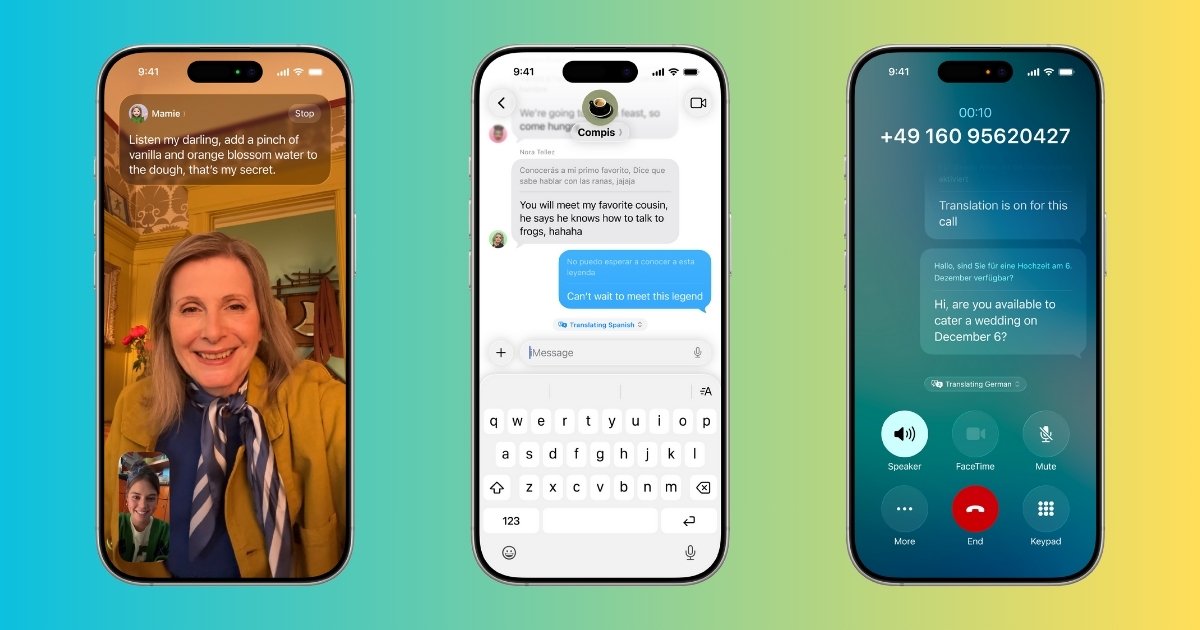
Apple is introducing Live Translation, powered by Apple Intelligence, for Messages, FaceTime, and Phone calls. 

“Live translation can translate conversation on the fly,” Leslie Ikemoto, Apple’s director of input experience, said Monday during the WWDC 2025 event. The translation feature is “enabled by Apple Built models that run entirely on your device so your personal conversations stay personal.”

In Messages, Live Translation will automatically translate text for you as you type and deliver it in your preferred language. Similarly, when the person you’re texting responds, each text can be instantly translated. 

When catching up on FaceTime, Apple’s translation feature will provide live captions. And on a phone call — whether you’re talking to an Apple user or not — your words can be translated as you talk, and the translation is spoken out loud for the call recipient. As the person you’re speaking to responds in their own language, you’ll hear a spoken translation of their voice. 

“For developers, it’s easy to enable live translation for calls within your communication apps with a new API,” Ikemoto said.

Apple did not yet share how many languages this would be available in.


Source link

Share. Facebook Twitter Pinterest LinkedIn Tumblr Email
IQ TIMES MEDIA
  • Website

Related Posts

Senior engineers, including co-founders, exit xAI amid controversy

February 11, 2026

Former Founders Fund VC Sam Blond launches AI sales startup to upend Salesforce 

February 11, 2026

Meridian raises $17 million to remake the agentic spreadsheet

February 11, 2026
Add A Comment
Leave A Reply Cancel Reply

Editors Picks

Gunman apprehended in southern Thailand after holding students and teachers hostage in school

February 11, 2026

Senegal youth say hope for change ends with protester death

February 11, 2026

San Francisco parents juggle work and kids amid teachers strike

February 10, 2026

Butler’s University’s new Deaf education curriculum draws concern

February 9, 2026
Education

Gunman apprehended in southern Thailand after holding students and teachers hostage in school

By IQ TIMES MEDIAFebruary 11, 20260

HAT YAI, Thailand (AP) — A hostage situation and a shooting were reported Wednesday inside…

Senegal youth say hope for change ends with protester death

February 11, 2026

San Francisco parents juggle work and kids amid teachers strike

February 10, 2026

Butler’s University’s new Deaf education curriculum draws concern

February 9, 2026
IQ Times Media – Smart News for a Smarter You
Facebook X (Twitter) Instagram Pinterest Vimeo YouTube
  • Home
  • About Us
  • Advertise With Us
  • Contact us
  • DMCA
  • Privacy Policy
  • Terms & Conditions
© 2026 iqtimes. Designed by iqtimes.

Type above and press Enter to search. Press Esc to cancel.