


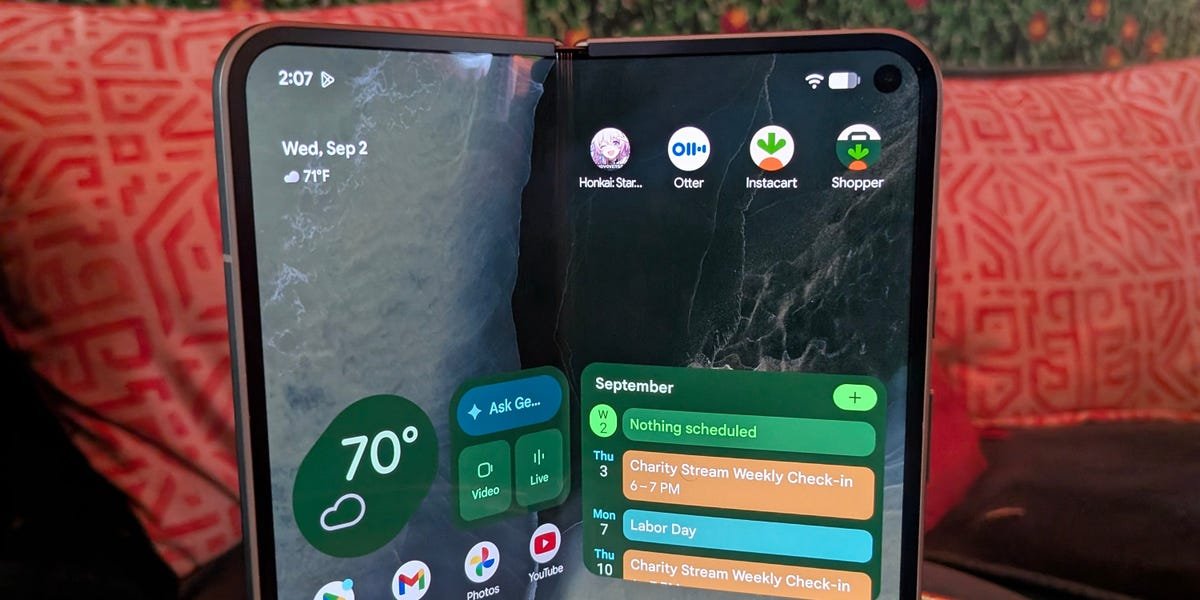
Another year, another Google Pixel Fold. This time, it’s the Pixel 11 Pro Fold, and Google is absolutely aiming for the top spot in the foldable market. And the company makes a good case for the crown. The phone is visually stunning and looks just as premium as competing phones in the space. It’s even managed to slim down a touch, making it Google’s thinnest, lightest Fold ever. But that beauty belies the most durable foldable in the business, as the only device with an IP68 rating (until the iPhone Duo launches, that is).
Running Android 17 and powered by Google’s new Tensor G6 chip, the Pro Fold isn’t after benchmark supremacy. Instead, it’s putting all that performance into speedier interactions, whether it’s multitasking or some AI functionality. And speaking of AI, Google has crammed every AI trick under the sun into this thing, with an attempt to make you wonder how you ever lived without such convenience. Need to make a dinner reservation? Gemini’s got it. Need to book a flight? Gemini’s got it. Want to watch your favorite Korean drama in English? Gemini’s got it.
And then there’s the cameras. Some incremental changes from last year, but those changes greatly expand what the Pro Fold’s capable of. And that’s before you throw in all the software tricks, old and new, that Google has up its sleeve.
But the brakes get severely pumped when we start talking about the Pro Fold’s price. I reviewed the 256GB version of the phone, which costs $1,899 (or $1,299 with an eligible trade). For that price, you can get a reasonably specced laptop and a budget tablet. The 512GB model costs $2,019, and the 1TB version is priced at $2,246. Each iteration is $100 more than last year’s model. And that’s nothing to sneeze at for an already expensive phone.
However, if you’re looking for one of the best foldables on the market and want the full Gemini Intelligence experience, the Google Pixel 11 Pro Fold is the only way to go.
Google Pixel 11 Pro Fold
Google’s latest generation of Pixel features stronger performance, Gemini-powered operations, camera improvements, and new features like HiLight notifications. The new Fold is also more durable, with a battery that can last over 24 hours.
Business Insider / Sherri L. Smith
Design: Google’s thinnest, lightest Fold ever is also its most durable
I have to hand it to Google; they made a visually stunning device. The Pixel 11 Pro Fold radiates the elegance you expect from a phone priced at $1,899. The Olive matte rear, paired with a satin composite finish and the gold spacecraft-grade aluminum frame, is a sophisticated colorway. The phone is also available in all black for those seeking a more understated look. But I would have loved to see the Fold 11 in Canyon Pink with a gold frame like the Pixel Pro XL and Pro 11.
Aside from the colors, at first glance, you’d be hard-pressed to find any differences between the Fold 11 and its predecessor. Once again, the power button also doubles as the fingerprint reader. It’s not my favorite, especially when there’s a nice big exterior screen where my finger would be better placed. However, the Fold 11 also features Face Unlock if you find the power button too cramped.
Business Insider / Sherri L. Smith
But the differences, like the devil, are in the details, starting with the smaller bezels of the exterior screen, providing that edge-to-edge glass look you love to see in smartphones. Google used that extra real estate to slightly expand the screen to 6.5 inches from last year’s 6.4 inches. The camera module also got a slight remix from last year’s design and now protrudes a bit more than the previous model. The lenses, flash, and sensor sit in a pair of raised glass ovals, so the phone doesn’t lie flat.
On the camera module, you’ll find the new HiLight feature. It essentially lets you designate colors for incoming phone calls (including WhatsApp calls) from chosen contacts, or indicate that Gemini is active for voice commands via LEDs in the flash module. I set my Mom’s calls to pulse pink, which came in handy when I had the phone face down. Right now, the feature is more of a kitschy gimmick than a must-have, but Google says it could expand HiLight’s functionality down the line. Not launching with any functionality for incoming texts seems like a poor decision, though.
Business Insider / Sherri L. Smith
The Fold 11 is also thinner than the previous model by 6.48% (0.7mm) when folded, and 3.85% (0.2mm) unfolded. The latest model is also lighter at 8.43 ounces, down from 9.1 previously. The Fold 11 is still heavier than the Samsung Galaxy Z Fold 8 (7.1 ounces), but it’s all relative, as I barely noticed the phone when I slipped it into my pocket. In this case, it’s all about the thinness, as I frequently found myself reaching for my Samsung Galaxy S26 Ultra, only to find the Fold 11 in my hand. The only surefire way to make the distinction was by the camera housing.
Business Insider / Sherri L. Smith
There’s no denying the Fold 11 looks nice, but it’s also pretty tough. Google claims the Fold 11 is three times more durable than last year’s device. And just like the Fold 10, the 11 is one of the few foldables with an IP68 rating, indicating the phone can withstand submersion in up to 1.5 meters of water for 30 minutes. An IP68 rating also indicates dust resistance, and while that seems to have you covered for dust getting under the screen, the hinge remains a weak point where dust, gravel, and other particles can get in and cause issues. Otherwise, the phone is pretty durable, with a ceramic cover glass on the front that can withstand a few light scrapes, a strong frame, and a glass/plastic hybrid rear that is much less likely to crack on drops. Durable or not, if you’re planning to spend at least $1,899 on a smartphone, make sure to check out our best Pixel 11 Pro Fold cases guide.
A new gearless hinge design, made of the previously mentioned space-grade aluminum, can withstand hundreds of thousands of opens over multiple years. However, recent tests have revealed the return of a glaring flaw: the phone cracks along the antenna line when it’s folded backward. It’s not something many people would do to a $1,900 device, but it’s worth being aware of. I learned that opening the Fold 11 can still be a bit of a hassle if you don’t have nails that can slip between the seam. A deeper lip or divot could alleviate this problem, but that’s a design problem for another generation of phones. A decent case would likely give you extra purchase to make opening the phone easier, too.
Business Insider / Sherri L. Smith
Performance: Flexing a different kind of power
You know what really grinds my gears? Using the same chip to run three different phones. For the price, I absolutely hate that the entry-level device has the same horsepower as my super-premium foldable. The only real difference is in the RAM. The baseline Pixel 11 and Pixel Pro 11 only have 12GB of RAM, while the Pixel 11 Pro XL (well, the 512GB/1TB versions at least) and 11 Pro Fold have 16GB. C’mon, Google, at least give me a souped-up clock speed, so I feel marginally special. Alas, every phone in the Pixel 11 lineup is powered by Google’s new Tensor G6 processor, which has the new Titan M3 to handle your security needs.
I’ll admit that I’m a power-for-the-sake-of-power kind of girl. So I was a little bummed out that Tensor G6 can’t really go toe-to-toe with the Qualcomm Snapdragon 8 Elite Gen 5 CPU. It’s not a slouch, by any means, but Google didn’t create the Tensor G6 with face-melting performance in mind, at least not in the way you’re used to. Instead of a shootout for benchmark supremacy across its CPU, TPU, and GPU, the Tensor G6 is focused on optimizing Gemini and camera functionality. Google claims that Tensor G6 offers 25% faster web browsing speed and 20% better battery efficiency.
All that’s to say, Google doesn’t think synthetic benchmarks should count against it. And judging by how quick and responsive the Pro Fold actually is in real life, I’m inclined to agree. Switching between apps, rotating the orientation, and multitasking were fast enough that I never noticed any lag. And speaking of multitasking, foldables like the Pro Fold were made for it. I’m never going to get tired of having the space to work in Google Docs while watching a video or researching a topic in Search, all while chatting with Gemini. Still, I wish Google would allow for more than two apps to be used in split screen, as Samsung has offered for years now with its Fold series.
Business Insider / Sherri L. Smith
That said, it is nice to see Google taking a page out of Samsung’s book with the new Bubbles feature. If you have an app you’re not using at the moment, instead of minimizing it, you can long-press and select the option to turn it into a Bubble. From there, it’ll float fairly unobtrusively until you’re ready to bring it back into the mix. Just tap it, and you’re right where you left off. You can create a maximum of five Bubbles at one time.
Gaming was also smooth. Even with visuals cranked to Very High and the frame rate to 60 frames per second, the Pro Fold didn’t drop a single frame, even after playing for almost two hours. And when I wrapped up my session, scrolling through websites felt zippy.
A bigger screen usually means higher battery consumption, which is why I was surprised to learn that the 11 Pro Fold (4,806mAh) has a smaller battery than the previous year’s model (5,015mAh). It’s not that much smaller, and Google claims the 11 can deliver all-day battery life. But still, every little bit helps. The Tensor G6’s promised efficiency allows Google to make such a confident claim. And while 24 hours of battery life is great, it’s less than the 30 hours Google notes for every other phone in the Pixel 11 lineup.
Business Insider / Sherri L. Smith
I immediately started putting that 24-hour claim to the test. Video calls, gaming, watching “Poppy Playtime” theory videos on YouTube, streaming music from Spotify, doomscrolling on Threads and Instagram, and yeah, doing a little bit of work. I made sure to keep taxing the Pro Fold to the best of my ability, starting at 9 a.m. Despite all that, the Pro Fold tapped out before me, as it still had 16% left in the tank at 4 a.m.
And when it was finally time to charge, the 11 Pro Fold could be charged faster than its predecessors. The phone boasts both 30W wired and 25W Qi2.2 wireless charging. The Pixel 11 Pro Fold is one of the few smartphones available that offers the newish wireless charging technology. That translates into a claim of only taking 30 minutes to get 50% charge. The claim is spot on: the phone reached 49% in 30 minutes when I charged it after finally draining the battery. The Galaxy Z Fold 8 charges faster on wired at 40W, but slower on wireless at 20W.
Business Insider / Sherri L. Smith
Displays: Bigger, brighter, and built for multitasking
The displays, both external and internal, are a joy to behold. It’s to be expected with OLED panels. The colors are rich and not overly saturated with deep blacks, which made watching the latest episode of Lanterns a real treat. But man, I wish that Google could find a way to minimize the seam on that ultra-thin glass that makes up the 8-inch internal display. And yes, I know every foldable has it to some extent, but Google’s is definitely the most noticeable. It’s a minor, but noticeable quibble that I want Google to address in future Folds.
Both displays boast a brightness of up to 3,600 nits, which means I never had to worry about the color washing out in direct sunlight. And whether I used the internal display or the 6.5-inch external screen while playing “Honkai: Star Rail”, the variable refresh rate (1-120Hz) kept the action looking smooth.
I was disappointed to learn that with a screen that large, Google has yet to add pen functionality. As a Galaxy Ultra and Note fan, I yearn to take notes, color, and journal on this thing. It’s a missed opportunity in my opinion.
Business Insider / Sherri L. Smith
AI features: The phone was built for Gemini, not the other way around
But as nice as the hardware and as smooth as Android 17 are, the Pixel 11 Pro Fold, just like the rest of the Pixel 11 lineup, is just a vehicle for Gemini Intelligence, a set of Google AI features spread across work, content creation, and play. As someone who’s constantly talking to myself, brainstorming ideas, or attempting to rattle off things on my to-do list, Rambler quickly became one of my favorite features. Instead of capturing my out-of-joint mutterings word for word, Rambler crafted them into potential text for my next articles. My favorite part, since I tend to think faster than I speak and use fillers like “um” and “uh,” was that it cleaned all of that up, creating a clear representation of my thoughts. And since I’ve been rewatching “Betty La Fea” as of late, I took Live Translate for a spin, and suddenly those soapy antics became much more entertaining without me having to concentrate on translating. Live Translate also works in tandem with Google Lens to translate signage and text in a near-instantaneous fashion.
Business Insider / Sherri L. Smith
But the most intriguing part of Google’s translation utilities is the live transcription for American Sign Language. When selected, the camera immediately turns on to capture video of the person signing for real-time translation. It’s a really cool feature that shows the company’s commitment to accessibility.
Then there’s Proactive Assistance, which, once enabled, allows Gemini to access Gmail and Google Messages to scan and anticipate your needs. For instance, based on my proximity to my favorite supermarket, Gemini launched my loyalty card. Or if you’re chatting with someone in Messages and mention you want to go out for Thai, Gemini will surface a card with suggestions and link to make reservations via OpenTable (if you have it installed). Or I was casually chatting with my partner about my dream vacation to Bora Bora. Suddenly, there was a helpful little card with potential flights for a trip that I’m woefully too poor to take.
It’s pretty cool if you’re cool with giving Gemini all that access. And even if you are, you have to find Proactive Assistance, which is buried deep in Settings. It’s an annoying trend with many of the AI features. I found myself asking Gemini where to find everything, and I’m a technology journalist; I can only imagine how frustrating this could be for a layperson. Other helpful AI features include smart call screening and blocking.
Business Insider / Sherri L. Smith
Cameras: Slight tweaks make a big difference
Aside from the AI, Google is making a lot of noise about the Pro Fold’s cameras, but do they live up to the hype? At first glance, the Pro Fold’s camera setup is practically identical to last year’s. The rear cameras are still made up of a 48-megapixel main shooter and a 10.5MP ultrawide. A 10.8MP telephoto with the 5x optical zoom rounds out the bunch. The telephoto remains one of the best in the foldable category, offering the longest reach of any book-style foldable.
But while the cameras haven’t changed, one of the sensors has. The main sensor has been bumped up to 48MP, which Google says will capture up to 56% more light for better results when using Night Sight mode or just taking shots in darker conditions. The telephoto lens also got some razzle dazzle via a software update and now sports a 30x Super Res Zoom. As for the external and internal cameras, they’re the same old 10MP shooters we saw last year. It’s not a bad thing, but it would have been nice to have an upgrade.
Business Insider / Sherri L. Smith
Now for those camera claims. I have to say, outside of a few instances with low-light shots and a couple of where I took the telephoto to the limits, I’m pretty impressed with what Google’s laying down.
Let’s start with the main camera. The shots I took of my burger and fries were very visually appetizing. The color accuracy was on point; you can see the different shades of red across the ketchup, the tomato on my burger, the Tabasco sauce, and the upholstered sofas in the background. Details were crisp, as evidenced by all the individual sesame seeds on the burger bun and the ridges on the lettuce leaves. If you zoom in, you can see the parsley on my crinkle cut fries and the individual foam bubbles in the head of my beer.
Business Insider / Sherri L. Smith
I also took quite a few shots of my girls. The camera accurately captured the slight brindle coloring on both dogs. A quick zoom shows off the individual hairs, their whiskers, and the folds in their tongues.
Business Insider / Sherri L. Smith
Now onto some ultrawide shots. And I’m enamored with the colors and the details of this street. You can clearly read the Grillpoint Deli signage, as well as the Feel The Vibe call to action on Vibe Gym. Speaking of the gym, it’s a cavalcade of color that you don’t want to take your eyes off.
Business Insider / Sherri L. Smith
I tested the 30x Super Res Zoom on the telephoto camera across various shots and lighting conditions. I had the best results with daytime shots. I took several shots of a nested sculpture atop a Broadway theater. While they’re all relatively good shots despite my shaky hand, I was really impressed with how clean the details were at max zoom. Aside from the individual pieces of synthetic wood that make up the nest, you can clearly see the sculpture’s clasped fingers. Even more impressive is that the beige-gray brick face behind the structure is clearly visible.
Business Insider / Sherri L. Smith
I also took pictures of a cross at the top of a massive church. The shots aren’t the clearest, which is probably more due to my lack of a good gimbal or stabilizer than anything else. However, the pictures are clear enough to show that some of the gold tiling has fallen off due to the elements.
Business Insider / Sherri L. Smith
Night photos were a mixed bag. The maxed-out, zoomed-in photo of the Empire State Building’s spire isn’t as clean as I would like. However, the camera still did a good job capturing the vivid blue LEDs illuminating the night sky.
I also took photos with Night Sight mode enabled and disabled. The shots I took of a deli mural looked great. Despite minimal lighting, the colors were still vibrant, and you could see the individual bricks under the paint. I really liked how good the blues and reds came out.
Business Insider / Sherri L. Smith
An ultrawide shot of Manhattan looked OK initially, but the more you zoom in, the fuzzier the detail becomes, especially all the lights, which look more like bright little globs.
Business Insider / Sherri L. Smith
My favorite night shot without Night Sight is of the Newtown Creek Wastewater Treatment Plant. The cobalt-blue lighting highlights the seams on the individual dome, and the city lights in the background make for a great picture.
Business Insider / Sherri L. Smith
My worst low-light shots were of my dog Jade before we went on a food run. The camera overcompensated for the sky’s lighting at my girl’s expense. You can barely make out any of her features, making her look like some amorphous nightmare creature.
Business Insider / Sherri L. Smith
Now on to Night Sight proper and that shiny new sensor. I have to say that the sensor definitely makes a difference. That muddy shot of my dog? I tried it again with my other pup, Natasha. And while it’s not as bright as I’d like, plus some unwanted blur, at least you can see more of her features, including her cropped ears, her brindle coat, and a hint of her eyes and nose.
Business Insider / Sherri L. Smith
The colors of a random stained glass window were vibrant without oversaturation, and the clear demarcations between each piece of glass were visible. You can also see the traces of grime on the white lintel above the window.
Business Insider / Sherri L. Smith
I also tried my hand at some astrophotography. And, like the previous picture of the cross, the result probably would have been better if I had followed Google’s advice and used a gimbal or something to hold the phone steady. But still, I managed to get an OK shot of the moon with some seriously heavy lifting from Gemini.
Business Insider / Sherri L. Smith
And finally, there’s the selfie cams. If it’s an individual selfie, the external camera is the way to go, as it provides a more flattering angle; group shots and more composed shots are best captured with the internal camera. Either way, I liked both results. Each camera did a bang-up job of capturing my skin tone, my green hoodie, and the myriad colors in my hair.
Business Insider / Sherri L. Smith
Business Insider / Sherri L. Smith
But Google didn’t stop with the cameras; the company added new software to help you get optimal performance from your stills and videos. As a tech journalist, I’m used to making videos on the fly. They’re not the cleanest thanks to my aforementioned problem with filler words. The Teleprompter feature in Google’s Creator Suite could make my job so much easier. And as anyone who’s shot video can tell you, I have a pretty loud voice, so much so that my audio levels are constantly in the red if left to my own devices. That’s why the Audio Visualizer is nifty: it lets you monitor audio levels. For editing, there’s Folder & Storyboard. The former saves your clips to a folder, while the latter lets you watch them in order, then trim and rearrange them for a quick rough cut.
Plus, you have upgraded Speech Enhancement, which can reduce background noise. Finally, there’s Social Media Grid, which adds helpful gridlines to help keep whatever you’re shooting in the proper social media proportions, depending on the platform.
Google also added Magic Capture, a new camera feature that captures video while taking stills, so you don’t have to worry about missing anything. It’s essentially a mashup between video and burst shot, but when you’re done, Gemini steps in to parse out what it thinks are the best stills. I got the best use out of Magic Capture with my two dogs as they played and rolled around in the dirt.
Other features like Made You Look, which displays funny animations in an attempt to get you to smile, make a return, as does Instant View, and one of my favorites, Add Me, which lets the photographer get in the picture too by stitching two photos into one.
Business Insider / Sherri L. Smith
Should you buy the Google Pixel 11 Pro Fold?
I’m a little on the fence with this one. On the one hand, I absolutely love the Pixel 11 Pro Fold’s design, cameras, and multitasking capabilities. Hell, even the AI features won me over. The displays are vivid and bright enough for outdoor use. And I love the multitasking abilities, but I really wish Google would add pen support. It’s not the most powerful phone on the block because it’s uber optimized for AI. However, I never had any problems playing games, watching videos, or jumping between apps.
And as much as I hate to admit it, Gemini Intelligence streamlines so many things. I can absolutely see myself letting Gemini take over some of the more tedious tasks on my plate. If I need to order groceries, I can ask Gemini to do it. Near my favorite store, and I want to pick up a snack? Gemini’s already pulled up my loyalty card. And the cameras can compete with those of any other flagship foldables.
However, I can’t wrap my head around that $1,900 starting price, especially when you can get the Pixel 11 Pro XL for $700 less (and even less if you qualify for a trade-in). Outside of the nifty multitasking and extra features that come with a foldable, you’re essentially getting a phone with nearly identical internal specs and a longer battery life.
If you aren’t squeamish about the price and aren’t a spec-stickler, the Pixel 11 Pro Fold is a great foldable. It’s stylish, durable, and offers great functionality that translates to work, play, and everything in between.
