


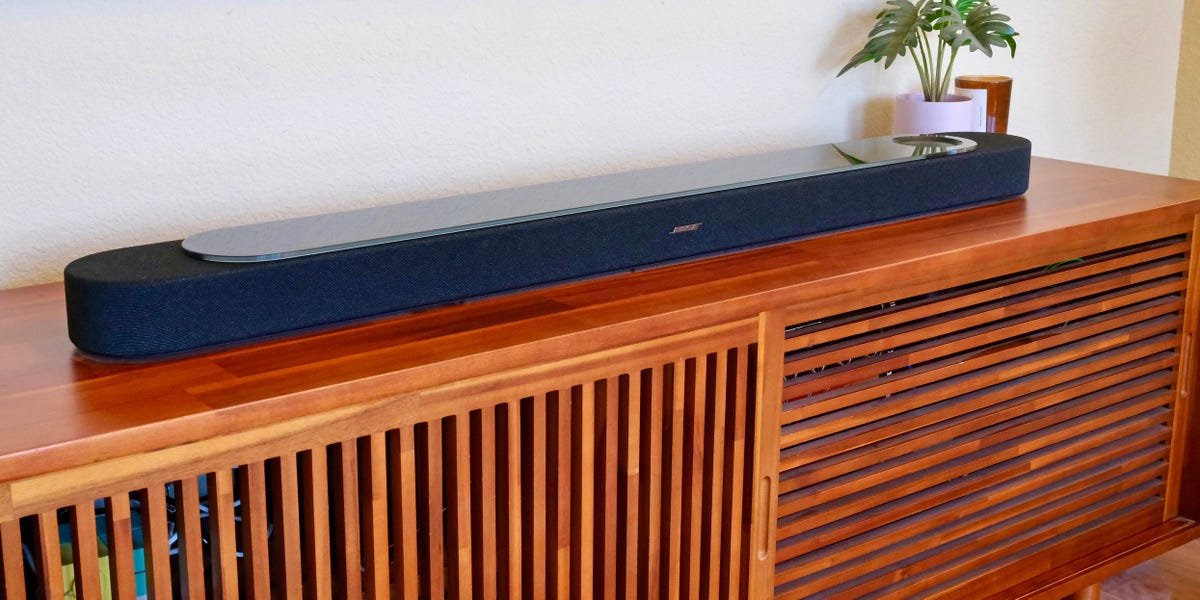
The Bose Lifestyle Ultra Soundbar is the company’s latest flagship home theater speaker. It’s part of the brand’s renewed focus on whole-home audio, and it joins the recently released Lifestyle Ultra Speaker and Ultra Subwoofer. All three devices can pair together to create a full surround sound system. But you don’t need to buy them all to get a great experience. On its own, the soundbar boasts impressive performance.
Dolby Atmos playback is supported with upfiring audio drivers that create a sense of height. There’s also an AI-enhanced dialogue feature that makes speech easier to hear. And though adding a pair of Lifestyle Ultra Speakers and an Ultra Subwoofer will create a bigger soundscape, the Lifestyle Ultra Soundbar does a solid job of simulating surround sound and delivering deep bass without any add-ons.
But as impressive as this soundbar is, it isn’t a clear winner for everyone. The biggest drawback here is that the Lifestyle Ultra Soundbar isn’t compatible with older Bose wireless speakers or subwoofers. Surround sound pairing only works with new Lifestyle models. If that’s a dealbreaker, this isn’t the soundbar for you. But if you’re a newcomer or don’t care about pairing with older Bose speakers, the Lifestyle Ultra Soundbar delivers excellent voice clarity, dynamic music playback, and robust movie sound.
Bose Lifestyle Ultra Soundbar
The Lifestyle Ultra Soundbar is Bose’s new flagship home theater speaker. It boasts immersive Dolby Atmos performance with deeper sound than its predecessor.
The soundbar is packed with features and Alexa+ smarts
Tyler Hayes/Business Insider
In some ways, the Lifestyle Ultra Soundbar feels like a playground for Bose’s latest tech, so get ready to learn a lot of new marketing terms. The soundbar incorporates various features with flashy names, such as QuietPort, CleanBass, PhaseGuide, TrueSpatial, CustomTune, and SpeechClarity. Those terms likely don’t mean much on their own, so let me break down what they actually do.
QuietPort and CleanBass both refer to the soundbar’s ported design, which vents the internal tubing. This helps make low-frequency bass less skewed and more powerful. PhaseGuide is Bose’s term for its sound projection process, which reflects audio so it sounds like there are virtual speakers all around the room. TrueSpatial is the company’s immersive audio processing, which can create a more three-dimensional soundscape from stereo sources. CustomTune adjusts the playback to your room’s dimensions. And SpeechClarity is Bose’s latest AI-assisted dialogue enhancement, available in low, medium, and high settings.
Many flagship soundbars from other brands offer their own versions of those features, so on paper, they’re nothing new. However, after seeing some behind-the-scenes demos and experiencing the soundbar in my home, Bose’s approach appears to use some meaningful, differentiated technology under the hood.
Tyler Hayes/Business Insider
When it comes to connectivity, the Lifestyle Ultra Soundbar features an HDMI 2.1 eARC port for pairing with a TV. It supports Dolby Atmos for movies, but not DTS or DTS:X. It can stream music from Apple Music via AirPlay or from Spotify via Spotify Connect. It supports Bluetooth and Google Cast, as well as built-in Alexa or Alexa+.
I tried Alexa+ with the soundbar, and it works just like an Amazon Echo. Bose’s more affordable and compact Lifestyle Ultra Speaker is a better fit for people who are specifically looking for a smart speaker, but there’s no reason this soundbar couldn’t be your primary digital assistant.
The top of the soundbar houses the device’s touch controls. I found these helpful for adjusting the TV volume when entering or leaving the room. Though the soundbar doesn’t include its own remote, it can be controlled by your existing TV remote so long as your TV supports HDMI CEC (most TV models sold in the last decade do).
Bose’s app takes a different approach than Sonos’
Bose’s mobile app for controlling the Lifestyle Ultra Soundbar errs on the side of simplicity. It doesn’t feature built-in access to music streaming services. To use the soundbar for wireless music, you’ll need to stream or cast music from your device using each individual service’s app. For example, you can stream Apple Music from your phone to the soundbar using the Apple Music app and Apple AirPlay connectivity.
This contrasts with Sonos’ approach, which integrates various music services into its own app so you can stream them all from one place. But that method can be more prone to glitches, as happened to Sonos after a botched app update in 2024. Seemingly, Bose saw the problems Sonos encountered with its app and decided not to go down that path, at least for now.
I do appreciate the straightforward interface and design of the Bose app. All the main controls are front and center. Your most frequently used speaker configuration and audio controls are one touch away. If you also have an Ultra Subwoofer or rear Ultra Speakers, you can toggle them on and off in seconds.
Similarly, if you turn on CustomTune, which uses your phone’s microphone to optimize the soundbar to your room’s dimensions, that EQ adjustment can be turned on and off. It’s easy to A/B test the sound profile and decide which you prefer. Even swapping the rear left and right speakers is a single button press in the app.
Movies sound immersive and dynamic
Tyler Hayes/Business Insider
I tested the Lifestyle Ultra Soundbar in multiple ways, including as part of a full surround sound system with two rear Lifestyle Ultra Speakers and a Lifestyle Ultra Subwoofer. This configuration enables a complete 7.1.4 experience. It gets unbelievably loud, yet remains controlled, like being in a theater. The immersion is impressive, but it’s also not surprising for the roughly $2,600 it will cost to buy all four components.
Mostly, though, I focused on using the Lifestyle Ultra Soundbar to watch movies and shows on its own. At $1,099, the soundbar itself is already an investment. I wanted to see what it could do, and a good soundbar shouldn’t need other pieces to sound full and substantial. The soundbar supports 5.1.2 Dolby Atmos playback and features two integrated upfiring audio drivers to bounce sound off your ceiling.
I love turning on “Dune,” “Interstellar,” “Ready Player One,” and other classic “testing” movies. The soundbar sparkled in the desert sand and reproduced the chaos of virtual reality racing with excellent fidelity. I also regularly use “Star Wars: The Force Awakens” to test soundbars. Its intro crawl is iconic, and the opening scene is full of deep-bodied dialogue and high-pitched lasers. The Ultra Soundbar played this movie perfectly. It captured the intended spectrum of audio elements.
Tyler Hayes/Business Insider
If you want the most immersive experience possible, you can adjust the soundbar’s height and surround effects in the Bose app. Separate from EQ, you can change the center, height, and surround options between -10 and +10. Depending on the movie or show, the effects can be extremely engrossing, especially the surround option. Personally, I preferred to leave these set to zero, but even at higher levels, they didn’t sound overly gimmicky like you might expect.
You can also toggle on SpeechClarity, which Bose says uses AI to enhance on-screen dialogue without dulling or altering other sounds. In my testing, I found that to be accurate. On low, it perfectly boosts dialogue just a touch, which often felt like how the movie should have been mixed in the first place. Going to medium and high levels sounds among the most natural of any “voice boosting” tech I’ve heard. This feature alone might not be a reason to buy this soundbar, but it’s tempting if you often have trouble hearing voices in movies and TV shows.
I also ran Bose’s CustomTune process a few times to adjust the soundbar to my environment. But since my living room is an average-sized rectangle, I didn’t notice much difference when I toggled it on and off. Other people with more atypical room designs may get more dramatic results, but the nice thing is that you aren’t confined to it.
How does it compare to similar soundbars?
Tyler Hayes/Business Insider
The Lifestyle Ultra Soundbar serves as a replacement for the older Bose Smart Ultra Soundbar, which also had upfiring drivers and similar capabilities. However, this newer Lifestyle Ultra Soundbar does deliver bigger, beefier sound overall. In that sense, it’s the better high-end soundbar for newcomers to Bose’s home theater lineup. But if you already own the previous-generation Ultra Soundbar, it’s not worth upgrading to this new model unless you want to go all in and build a full Bose Lifestyle surround sound system.
To further test the Lifestyle Ultra Soundbar, I also put it head-to-head with its biggest competitor in this space: the Sonos Arc Ultra. Sonos’ flagship soundbar also retails for $1,099 but is sometimes on sale for as low as $899. Both are complete home theater solutions in their own right, but in my back-and-forth comparison, I found the Arc Ultra edged out Bose’s soundbar in bass.
To my ears, the Arc Ultra puts out more low-frequency sound. In a blind test, you might even be able to convince someone that the Arc Ultra is using a dedicated subwoofer when it’s not. That would be less likely with the Lifestyle Ultra Soundbar, though I would still describe it as full and powerful.
Music sounds great, too, but there is a catch
Tyler Hayes/Business Insider
Although the Lifestyle Ultra Soundbar is primarily a home theater soundbar designed for movies and TV shows, it can also serve as your living room music speaker. This is where Bose’s TrueSpatial technology comes in handy. It uses the soundbar’s upfiring drivers to expand the soundstage of any music source.
I primarily used Apple Music to AirPlay songs to the Lifestyle Ultra Soundbar, and I also compared music playback with a Sonos Arc Ultra. The Bose Lifestyle Ultra Soundbar has a slightly sharper sound with the default EQ. Even though there’s full, rich bass, the highs cut through more, and the whole sound is brighter than Sonos’ offering.
There’s another distinction between the two. The Sonos Arc Ultra supports native Dolby Atmos music playback, while the Bose Lifestyle Ultra only supports Atmos for movies and TV shows. With native Dolby Atmos playback, a soundbar uses metadata embedded in the music track by the recording engineers to place sounds accurately through its upfiring drivers. Bose, by contrast, relies on its own TrueSpatial processing to create a similar effect, deciding for itself how to position the different elements of a music track. Though Bose’s TrueSpatial tech works well enough, native Atmos music playback would be more accurate, and it’s odd that it’s not supported.
While I wouldn’t recommend spending the money on the Lifestyle Ultra Soundbar just as a music speaker, it works well as a secondary function when your TV is off. The volume is tremendous, and it could easily serve as a party speaker.
Other cons to consider
Tyler Hayes/Business Insider
Although Bose’s mobile app is well-designed and easy to navigate, I have run into some bugs when pairing additional components. There were a couple of times when the Ultra Subwoofer would disappear from the app. That problem seems to have been resolved. I was also having problems early on trying to set up two Ultra Speakers as a stereo pair. It’s not uncommon for new products to have some software issues at launch, so hopefully these kinks will be ironed out.
There’s another more notable drawback shoppers should keep in mind. As I mentioned in the intro, the Bose Lifestyle Ultra Soundbar can only pair wirelessly with other Bose Lifestyle products. Even though Bose has several other subs and rear speakers, you can’t use any of them to create a wireless surround sound system with this soundbar. Whether that’s due to a technical reason or not, customers on various forums aren’t happy about not being able to use recently purchased Bose gear. You can’t keep your existing wireless Bose Bass Module 500 subwoofer, for example, and upgrade to the Lifestyle Ultra Soundbar.
However, there is one exception. You can still use a Bose Bass Module 700 with the Lifestyle Ultra Soundbar if you use a wired connection. Otherwise, your only option for extra bass is the Bose Lifestyle Ultra Subwoofer.
Should you buy the Bose Lifestyle Ultra Soundbar?
Tyler Hayes/Business Insider
The Bose Lifestyle Ultra Soundbar has enough low-end thump to make movie scenes feel big, even on the small screen. But it’s also good at making it sound like there are more speakers around your room than there actually are. It has terrific dialogue enhancement, which is not a guarantee with all soundbars. The Ultra Soundbar has plenty of wireless connectivity and room to grow. It’s a good example of why this type of single-speaker solution is taking over the home theater space.
But it’s not perfect. The biggest downside might be the level of commitment and trust required to buy into Bose’s new Lifestyle Collection. Older Bose speakers can’t be used with this soundbar to build a system. Your choices for rear speakers and a subwoofer are limited to one each — a $900 subwoofer and a $600 rear pair.
But so long as that caveat isn’t a dealbreaker, the Bose Lifestyle Ultra Soundbar certainly performs well. It’s a great alternative to the Sonos Arc Ultra for people who prefer the Bose brand or who have jumped ship from Sonos after its 2024 software problems.
For more audio recommendations, check out our full guides to the best soundbars and best Bose soundbars.
