


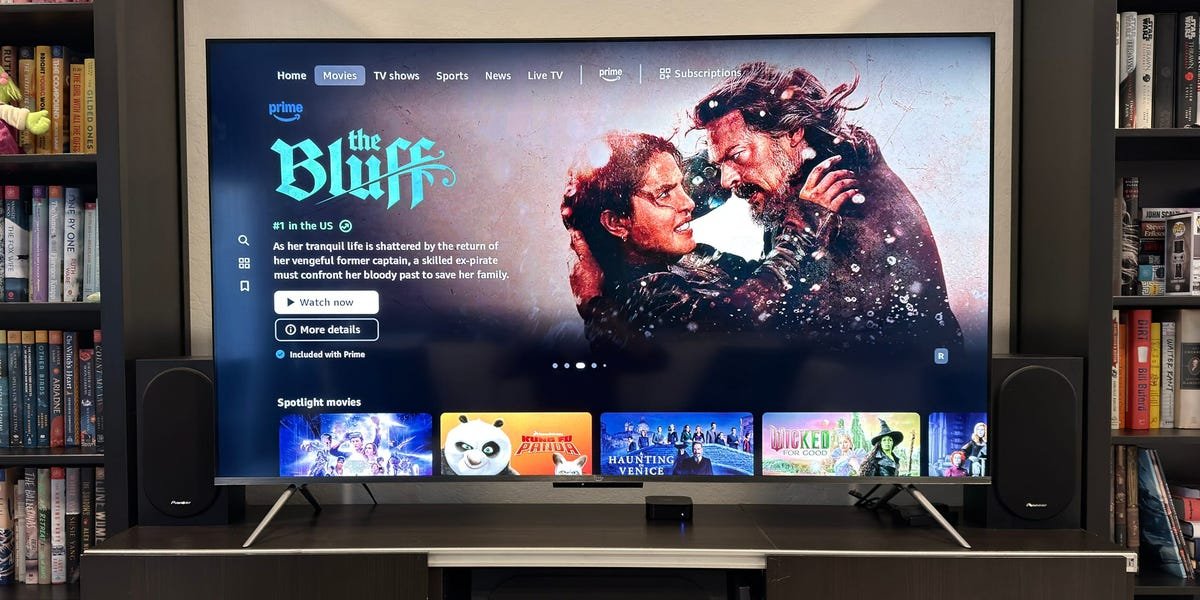
Amazon’s Fire TV Omni QLED sits in the middle of the company’s smart TV lineup. It delivers better picture quality than the brand’s cheaper sets, but is still a clear step down from its more advanced Omni Mini LED. The first-generation Omni QLED launched in 2022 and has since been replaced by a second-generation model. While this newer version offers a slight performance bump, it carries over too many of the original’s shortcomings and struggles with too many flaws across its picture presets.
Simply put, the Fire TV Omni QLED is outmatched by similarly priced rivals from TCL and Hisense. The 65-inch model I reviewed has a list price of $850, but it just doesn’t perform as well as it should for that cost. You’re better off snagging a TCL QM7K, which offers better contrast and a much brighter picture, often for around the same price. Even cheaper Mini LED sets, like the TCL QM6K or Hisense U65QF, deliver better overall value for the money.
It’s too bad, because the TV is otherwise a solid option for bringing your favorite streaming services under one roof, and the Omni QLED’s built-in Alexa+ functionality is a handy perk for anyone who’s already bought into Amazon’s ecosystem. But ultimately, it’s just hard to recommend the Omni QLED over those aforementioned rivals. Here’s where this model falls short of the best TVs in its class and why I recommend grabbing those TCL or Hisense sets instead.
Amazon 65-inch Fire TV Omni QLED (2025)
The Omni QLED is Amazon’s midrange smart TV model. This 2025 edition is a slight improvement over its predecessor, but it still lags behind similarly priced rivals from TCL and Hisense.
The Omni QLED is available in 4 sizes, but the smallest option is missing a key feature
David Murphy/Business Insider
The Fire TV Omni QLED comes in four sizes: 50, 55, 65, and 75 inches. Pricing ranges from $480 to $1,200, notwithstanding any sales or limited-time discounts.
No matter what size you choose, every Omni QLED offers the same basic specifications and capabilities, save for one notable exception: if you opt for the 50-inch model, you lose local dimming, which greatly limits that size’s contrast performance. Beyond that distinction, all sizes use a QLED panel with an LED backlight.
The Fire TV Omni QLED has a 60Hz refresh rate, but falls short of the 120Hz or 144Hz offered by some competitors in this class. Though 60Hz is fine for standard gaming, some PS5 and Xbox Series X titles support 120Hz modes for smoother motion. If that’s a priority, check out our guide to the best gaming TVs for display recommendations that support 120Hz and higher refresh rates.
Amazon’s TV comes with three HDMI 2.0 ports and a single HDMI 2.1 port (eARC). You can hardwire the TV to your network via the included Fast Ethernet port, or connect it to your WiFi router (supports up to WiFi 6 but not WiFi 6E). I measured 5GHz WiFi speeds of around 300 Mbps when I sat the TV under my WiFi 6 access point (comparable to my iPhone 16 Pro), but a paltry 90 Mbps over its Ethernet connection. That’s more than enough to stream a 4K movie, but it’s awfully slow for any hungrier apps, games, or downloads.
David Murphy/Business Insider
Two speakers come built into the TV. They don’t wow, nor do they support virtualized Dolby Atmos (unlike the pricier Omni Mini LED), but they’ll do in a pinch if you don’t have external speakers or a soundbar to pair with the set. When I fired up a few Deadmau5 tracks for some background music during a board game night, the bass was fine, but nothing to get excited about.
You get a Fire TV Alexa Voice Remote Enhanced alongside the TV, which makes it easy to summon apps, change channels, and adjust the volume — among countless other actions — using your voice. You can also just yell “Alexa” at the set since it has a built-in mic for hands-free control. Either way, you’ll be able to tap into the new AI-driven Alexa+ model that Amazon recently launched for all US customers (for a $20/month fee or free for existing Amazon Prime members).
This is a huge upgrade over bare-bones Alexa, especially if you frequently need to know more complex information rather than just barking simple smart home commands. Alexa+ isn’t unique to this TV, but I’m glad this inexpensive set supports it. (If nothing else, it’s great for finding out which streaming app you should use for a movie or TV show.)
Getting the best picture out of the Omni QLED feels like finding a needle in Amazon’s haystack
David Murphy/Business Insider
As with all televisions, Amazon’s Omni QLED offers a number of preset picture modes that vary depending on the type of content you’re watching (SDR, HDR, or Dolby Vision, for example). Each mode changes a range of settings, from the TV’s overall brightness to its color temperature.
I tested the TV’s image quality across its various presets in SDR (standard dynamic range) and HDR (high dynamic range) using a mix of test patterns and real-world video clips, all measured with Portrait Displays’ Calman software. I try to find the preset that delivers the best color and grayscale accuracy out of the box, since most people don’t fiddle with settings too much. I then run all supplemental tests from that. But once I started my evaluations, it quickly became apparent that the TV’s poor presets would be a bigger issue than I anticipated.
The Omni QLED performed well on only two SDR presets: Filmmaker and Movie (Dark). Every other preset had awful color accuracy, delivering average DeltaE values around six to nine in most cases, and sometimes even shooting into the double digits. Great TVs should have DeltaE values under three (lower is even better), which means the color or shade of gray you’re seeing is close enough to what should be shown that you won’t likely notice a problem.
Of course, it’s not uncommon for TVs to have a few inaccurate presets. Even Amazon’s flagship Omni Mini LED TV struggled with consistency across its presets, as I experienced similar issues in SDR (and, again, found Filmmaker to be the best-performing mode). However, when I started testing the Omni QLED’s HDR performance, the TV fell right off the proverbial cliff — so much so that I reset my entire testing setup multiple times to confirm it wasn’t me messing things up.
Almost every preset I tested delivered awful results for color and grayscale, with most hitting double-digit DeltaE values and then some. The set’s “Vivid” preset was the worst, but while Vivid modes are notorious for being inaccurate, I at least expected the TV’s HDR Filmmaker preset to offer solid accuracy out of the box. After all, that’s what Filmmaker mode is supposed to be for. Unfortunately, this mode’s default settings hit an average DeltaE of 9.5 for grayscales and 19.3 for color, which I’d normally consider “very bad,” were it not for other presets spiking into the 30s.
Ultimately, the set’s HDR Movie Bright preset performed best right out of the box, achieving DeltaEs of 3.3 and three for grayscale and colors, respectively, which are good numbers. So, why did HDR Movie Bright perform so much better than Filmmaker mode? Strangely, the Omni QLED’s Filmmaker mode automatically enabled the TV’s “Intelligent HDR” feature for HDR content, which is normally used to optimize SDR content for HDR, and it disabled other critical features like local dimming and HDR tone mapping. This caused contrast issues, with the TV flattening critical detail in both shadows and highlights.
Dimly lit scenes, like characters sitting around a campfire at night, looked murkier and lifeless in Filmmaker mode compared to the TV’s Movie Bright preset, which emphasized details in the darker parts of the image a lot more (and resurrected life into the aforementioned fire). When I went to look for specific differences between the two, I noted that the Movie Bright preset correctly turned off Intelligent HDR and set the TV’s local dimming to “Medium,” but otherwise matched the Filmmaker mode’s brightness and contrast settings. While it’s good that Movie Bright offers a solid image, it’s odd that Filmmaker Mode delivers such a compromised experience using its default settings.
Even at its best, the Omni QLED has issues with blooming
David Murphy/Business Insider
Even with the TV’s ideal display preset, the Omni QLED still has some picture limitations, especially compared to TVs that use Mini LEDs. Though the 65-inch Omni QLED has local dimming, its use of regular-sized LEDs rather than Mini LEDs can contribute to a side effect known as blooming. If you think of your TV as a giant grid, blooming occurs when something that should be bright is in or near the same dimming zone as something that’s dark. The backlighting spills over into the darker zone, creating a halo effect that can be distracting.
I compared Amazon’s Omni QLED and pricier Omni QLED Mini LED models side-by-side, and I found my eye drawn more toward the Mini LED TV than the QLED. Even with local dimming active, the Omni QLED showed a distinct underlying brightness in the darkest parts of murky scenes, which can be distracting, especially against the letterboxing black bars you’ll often see at the top and bottom of your screen. You can often tell where the picture stops and the bars begin.
On Amazon’s Omni Mini LED, dark parts of scenes practically blend into the TV’s background, and it’s even more impressive when this happens within scenes that contain a mix of very dark and very bright elements (a campfire, an angry wizard’s glowing staff, an exploding tower, et cetera). Mini LED TVs from other brands, like TCL’s QM7K, offer similar performance benefits, which is noteworthy, since the QM7K is often around the same price as the Amazon Omni QLED. It’s also worth noting that the Omni QLED is significantly dimmer than the QM7K.
Using the Filmmaker preset, which disables local dimming by default, I measured the Omni QLED’s maximum potential HDR brightness at 500 nits for a 10% window. When I manually set local dimming to “high,” the brightness bumped up to 680 nits for a 10% window. In comparison, the TCL QM7K reaches a whopping 1,700 nits in the same test, a substantial increase. Meanwhile, Amazon’s Omni Mini LED is also notably brighter than the Omni QLED. That set hits roughly 1,422 nits for a 10% HDR window. Even Hisense’s cheaper U65QF gets brighter, at around 1,000 nits.
Brigher HDR measurements translate to more intense, detailed highlights. My favorite test scene is the nighttime Arrakis assault in 2021’s “Dune,” which features frantic and gigantic explosions. Nighttime warfare is nowhere near as vibrant or visually pleasing on Amazon’s Fire TV Omni QLED as it is on Mini LED models with higher contrast and higher peak brightness.
The Fire TV interface is fine, but packed with too many ads
David Murphy/Business Insider
Nothing has changed in Amazon’s Fire TV interface since I last looked at it — for better or worse. Fire TV does a pretty good job of bringing together all of the content, apps, and services you’d regularly use, including its smarthome-and-everything-else assistant, Alexa+.
My biggest gripe with the Fire TV interface is the advertising: It’s as inescapable as it is annoying when a gigantic ad for something like CeraVe moisturizer covers the upper half of the first screen you see when turning on the TV. You’ll also get the usual bevvy of sponsored content recommendations throughout the TV’s “Home” feed — less intrusive, and occasionally helpful, but advertising nevertheless. But that’s intermingled with greater annoyances, like when I saw an ad as wide as the TV for Bounty paper towels (available for purchase on Amazon, naturally).
It’s difficult to escape advertising and sponsored content on most TVs, set-top devices, or streaming sticks, but on the Fire TV Omni QLED, it’s so pervasive I sometimes wanted to run screaming to my Apple TV for comfort. I don’t mind recommendations for shows, sponsored or otherwise, but giant banners for random supermarket products are where I draw the line. At least consider my recent shopping history, Amazon?
If you don’t mind doing a little cleanup (namely, removing apps like “News: Watch Free” and “Tubi: Free Movies & TV” from your quick-access list of app shortcuts), it’s easy to install and launch all the major streaming services you’ll ever need. That includes everything from heavyweights like Netflix and Apple TV to Twitch, YouTube, and Movies Anywhere, all the way to Plex, if you’re planning a lot of streaming on your home network. The only streaming app I frequently use, but couldn’t find, is Apple Music.
David Murphy/Business Insider
It’s a treat to have a gigantic screen that supplements some Alexa queries. Ask Alexa for the weather, and you get a nice little visual of the forecast to accompany the digital assistant’s verbal response. It takes almost no effort to launch one of your apps, switch to a live TV channel, or even pull up a gigantic smart home hub for controlling connected lights, switches, and anything else with your TV remote (or voice). When the TV’s off, I especially appreciate that Alexa will respond to you without forcing the set to flick on.
The Fire TV Omni QLED also did an excellent job integrating with my other living room devices (including a Denon receiver, Apple TV, Nintendo Switch, and Steam Deck). For example, the TV would always turn on when I’d turn on my receiver, and I could use either my receiver’s remote or Amazon’s included Fire TV Alexa Voice Remote Enhanced to control the volume. Fire OS is generally responsive throughout its normal interface, but it started to feel a little sluggish within various streaming apps. Coming from the Apple TV, which feels buttery smooth, the Fire TV experience was a little rougher to navigate for movie nights.
Should you buy the Amazon Fire TV Omni QLED (2025)?
David Murphy/Business Insider
Amazon’s Fire TV Omni QLED costs too much for what you get. You have to work way too hard to achieve decent picture quality, and the set is dimmer than rivals you can often find for around the same price or less. It’s especially problematic that the display mode that’s supposed to deliver the most accurate image — Filmmaker mode — is a less-accurate, worse-looking option than the obscurely named Movie Bright preset.
Almost every preset on this TV is lacking. While many TVs have problems with consistency, working with the Fire TV Omni QLED is like playing Minesweeper on the hardest difficulty: most people won’t come out ahead. At that rate, you might as well pay less and pick up the largest budget TV you can find. You may not notice a quality difference, but you’ll certainly appreciate a huge screen.
Otherwise, I recommend opting for a TV that uses a Mini LED backlight, like Amazon’s step-up Fire TV Omni Mini LED TV, which offers a much-improved display and the exact same Fire TV experience as the Omni QLED. Or better yet, bypass Amazon altogether and pick up something like the TCL QM6K or QM7K, which offer better contrast and a higher refresh rate while costing around the same or less than the Omni QLED. Considering its rivals, Amazon’s Fire TV Omni QLED just can’t compete on price or quality.
For more Fire TV recommendations, check out our complete guide to the best Amazon Fire TV devices.
