


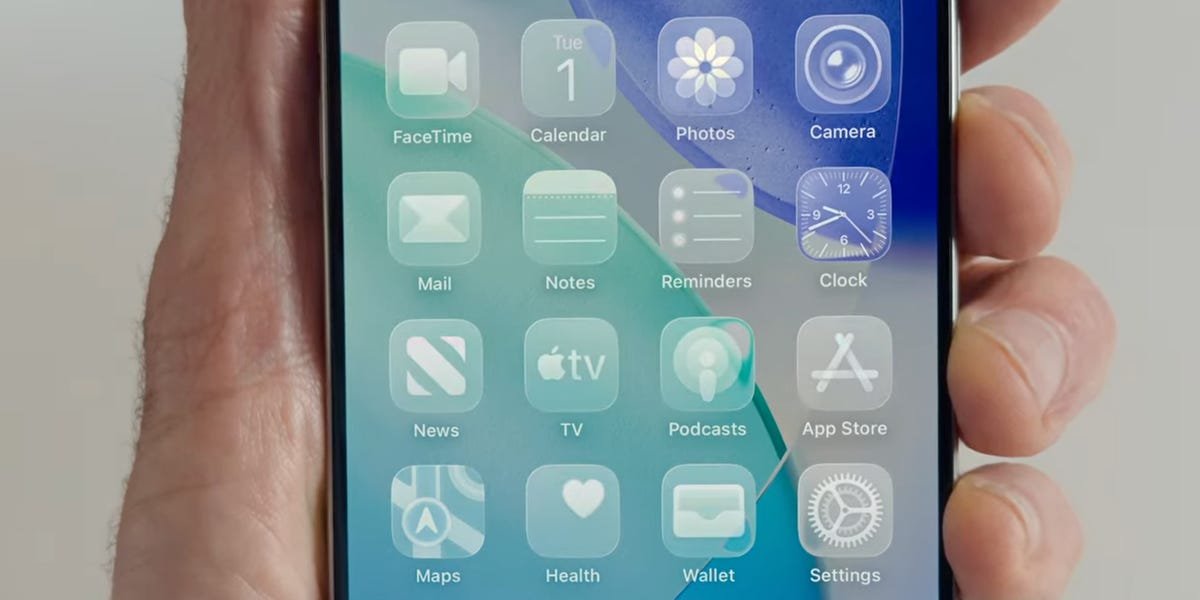
Apple just unveiled its biggest software redesign in over a decade.
The company held its annual WWDC 2025 developer conference on Monday, where it announced a slew of new features across its suite of products and services, including several standouts coming to the iPhone.
The new iPhone software, iOS 26, will be pre-loaded on the iPhone 17 this fall, and you’ll be able to update your existing iPhone around then, too.
We rounded up our favorite announcements, focusing on the new iOS 26 features we found to be the coolest or most useful.
Let’s dive in.
The new look: Liquid Glass
Apple
While it’s not exclusive to the iPhone, Liquid Glass was the main event at WWDC 2025.
It’s Apple’s new design language for its software and the company’s first major software redesign for the iPhone since iOS 7. It extends across Apple’s other devices too: It’ll be available later this fall in software updates for Mac, iPad, Apple Watch, and Apple TV.
With a translucent, glass-like aesthetic, the Liquid Glass design adapts in different environments based on content and context and is coming to everything from switches and sliders to the iPhone’s home screen and control center.
Related stories

Business Insider tells the innovative stories you want to know
Business Insider tells the innovative stories you want to know
More Visual Intelligence features
Apple
If you have an iPhone that’s powerful enough to run Apple Intelligence, there are some new Visual Intelligence features coming that can tell what’s on your screen to help you take various actions.
If you’re scrolling on social media, for example, and you find a product you like, you can press the same buttons you’d press to take a screenshot, and a new option will offer Visual Intelligence capabilities, including searching sites like Google and Etsy for the product to buy. (Android users familiar with Google’s Lens AI tool have enjoyed a similar feature for a bit now.)
You can also ask ChatGPT about what you see on your screen, or if you come across an event, you can add it to your calendar, prepopulated with the date, time, and location.
Big improvements to your group chats
Apple
Messages also get an upgrade in iOS 26. Typing indicators — the bubble with three dots that lets you know when someone is typing — are coming to group chats; these were previously only available in one-to-one messages between two people.
And look out, Venmo: You can also start requesting, sending, and receiving Apple Cash in group chats.
In addition, you’ll soon be able to create polls and set backgrounds for a chat, whether you choose from a preset offering or use AI to make a custom one in Apple’s AI image generator, Image Playground.
In messages, you can start making Frankenmoji (not an Apple term, that’s just ours) to combine multiple emoji or Genmoji, and even a text description of anything else you want to add, to create a unique one.
Help dealing with pesky phone calls
Apple
The Phone app will look a lot different in iOS 26. Instead of the call log, voicemails, and favorites being under separate tabs, they’re combined to show who’s calling, what they’re saying, and who you might want to call.
There’s also the Call Screening feature, which essentially answers unknown calls for you to determine whether or not they’re spam. If the transcript looks legit, you can answer the call yourself.
Hold Assist, another new feature, can detect hold music on customer service calls and keep your spot in line until an agent is available to help, so you don’t have to sit there waiting for them.
New travel tools
Apple
Your Apple Maps app is getting smarter. As you move about, Maps will learn your routine and suggest better routes each day. It will know your preferred route and adapt to changes to your daily commute.
With the new Visited Places feature, you don’t have to rack your brain for that restaurant you went to but can’t remember the name. Your iPhone will detect where you are and store it in case you need to come back to it later.
As for air travel, boarding passes are getting a new look, and there will be in-airport directions to find your gate.
There are also new features to help get you through TSA with fewer physical documents in your hand. In nine participating states, you’ll be able to store your ID in your Apple Wallet.
“Digital ID can be used for domestic travel at supported TSA checkpoints, in apps and in person where age and identity verification are required,” Apple says.
